Steel box girder redesign in place of cast-in place concrete box
Linear static modelling using beam and shell elements
Significant cost savings made
Finley Engineering Group, Inc. (FINLEY) used LUSAS Bridge for its engineering redesign of the Estero Parkway Flyover in Fort Myers, Florida, for the contractor, ZEP Construction. In doing so, FINLEY four-steel box girder design produced significant savings in construction costs over an initially proposed cast-in-place concrete box girder design. As the result of the engineering redesign done using LUSAS and cost-effectiveness measures taken by Zep Construction, $1.85 million will be passed to the project owner, Lee County, Florida, as a value engineering credit.
Overview
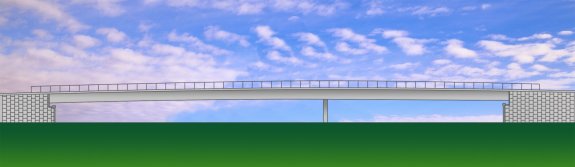
The Estero Parkway Flyover is 561 feet long, with spans of 340 and 221 feet, and approximately 116 feet wide. It will extend Estero Parkway over Interstate 75, connecting with Ben Hill Griffin Parkway, which then meets with Corkscrew Road to the southeast of the city.
FINLEY redesign replaces proposed twin, cast-in-place concrete box girders with a single, four-steel box girder design. This solution provides significant savings with the elimination of a large falsework support system, reduced construction time, reduced foundation design requirements and simplified construction. By using shallower steel girders, shallower approach grades can be used, saving fill and construction time. It also means that the contractor can erect the bridge in longer sections meaning fewer obstructions in the roadway.
The new design uses a staged temporary tower support scheme to optimize the efficiency of the steel section which allowed the steel bridge solution to be more attractive against a cast-in-place concrete one. The redesign also enhances overall project safety with the elimination of the falsework system over the interstate and reduces the risks associated with a constrained traffic pattern through the falsework system.
Bridge Construction
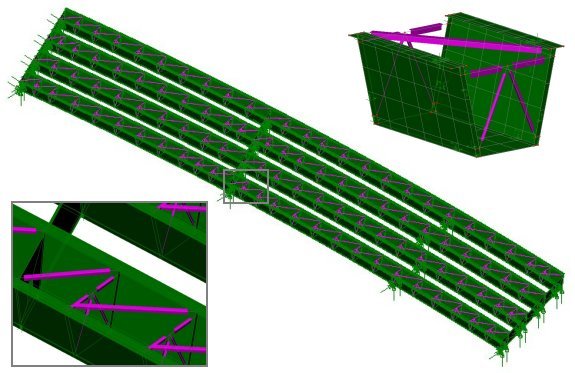
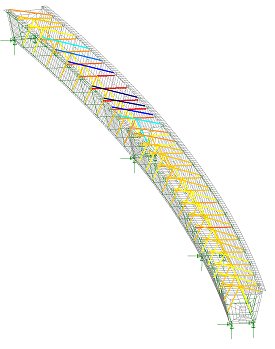
Each curved steel box girder comprises webs of 1″ thick plate and top and bottom flange thicknesses of 1-1/4″ plate. Internal X bracing formed of WT and L sections is used in conjunction with diagonal top flange bracing of WT sections to stiffen the girders. At supports, 1-1/4″ thick internal diaphragms with access holes are used with end diaphragms of 1/2″ thick web and flange plates connect adjacent girders.
Modelling and analysis
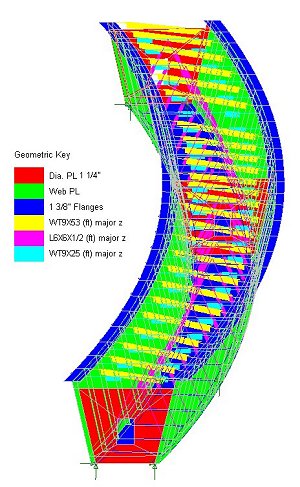
In all, 15,000 quadrilateral thick shell elements modeled the 4 box girders and stiffeners in the bridge structure. Customized displays of assigned geometric attributes such as steel plate sizes were produced by visualizing each thickness in turn – especially useful for checking that the correct thickness assignments were made. This in conjunction with the LUSAS groups facility, which permits easy definition and isolation of each sub-element of the model for display and model building purposes, and the fleshing facility, which helps ensure the correct orientation of standard section sizes is obtained, helped FINLEY to build the model in a very straightforward manner. Pinned supports including the temporary supports beneath the longest span were assigned to the model and a linear static analysis was carried out. From the LUSAS analysis overall girder displacements and stresses in the bracing struts and girder plates were obtained for the applied loading.
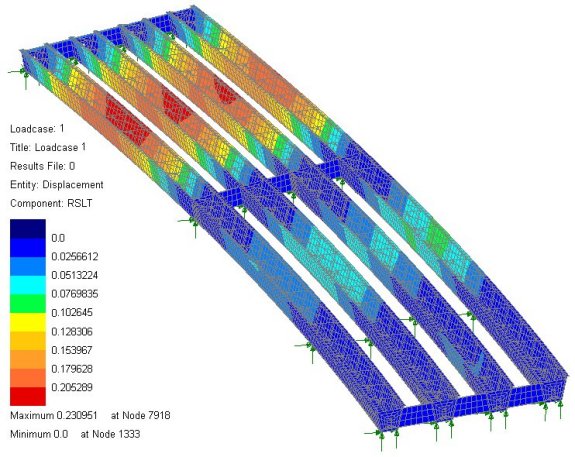
Resultant displacements from deck pour loading
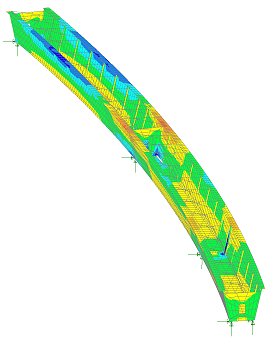
Typical absolute stresses in girder 1 from deck pour
Colour coded axial stresses in girder 1 bracing struts from deck pour
Benefits obtained
Craig Finley, president of FINLEY said: “We see this as a great example of what can happen with value engineering when the owner, contractor and engineer come together to create a design that takes the contractor strengths into account and that utilizes the best material and the most appropriate software for the challenges of the project.” He added: “In this case, the redesign from concrete to steel had an overall positive effect on the cost, schedule, and efficiency of the bridge, and the use of LUSAS helped us meet our design deadline and to prove an alternative bridge design that will ultimately save the client a great deal of money in construction costs.”
This view was echoed by Donald Deberry, P.E., public works operations manager for Lee County. “We are obviously pleased,” he said. “We always appreciate working with engineers and contractors who are willing to take a second look at projects and find ways to give the public more bang for their buck.”
“The use of LUSAS helped us meet our design deadline and to prove an alternative bridge design that will ultimately save the client a great deal of money in construction costs.”
Craig Finley, President, Finley Engineering Group Inc.
유사 사례
아이들의 교량
[Bridge] 워터게이트 교량해석(아일랜드)
킹스턴 교량의 폭 확장 및 강화
세그멘탈 교량 기술의 발전
[Bridge] 진보하는 세그멘탈 교량 기술 (이스라엘)
[Bridge] 장대레일 철도교의 해석 자동화 (한국)
[Bridge] BS5400에 따른 교량평가 (영국)
[Bridge] Sheffield Supertram System 구조해석 (영국)
[Bridge] Estero Parkway 고가교의 재설계 (미국)
레드헤이즈 교량
라이센싱을 위한 컴퓨터 정보 확인
1. LUSAS 설치
LUSAS를 설치합니다.
2. PC 정보 저장
윈도우 시작> LUSAS > Configuration Utility 를 실행합니다.
‘Create/report…’ 버튼을 클릭하여 텍스트 파일로 저장합니다.
네트워크 라이센스
License key 란 ?
컴퓨터 정보 또는 USB Lock 정보와 결합하여 사용할 수 있는 기능 범위 등의 정보를 저장하고 있는 텍스트 파 입니다. 유효한 Licence Key 를 프로그램에 등록하여야 LUSAS 를 사용할 수 있게 됩니다.
네트워크 라이센스 란 ?
LUSAS Network License Manager 를 설치한 컴퓨터를 License Server 라고 할 때, License Key 는 License Server 에 등록합니다.
Network License 2 User 를 구매하였다면, License Server 와 네트워크로 연결되는 어느 컴퓨터에서건 최대 2 사람이 LUSAS 를 사용할 수 있게 됩니다.
이 때, Modeller 와 Solver 는 별도로 인지하므로, 오랜 시간이 소요되는 해석 작업을 2 대의 컴퓨터에서 수행 시키고 나머지 2대에서 모델링 작업을 수행할 수 있습니다.
네트워크 라이센스 등록
License key 란 ?
컴퓨터 정보 또는 USB Lock 정보와 결합하여 사용할 수 있는 기능 범위 등의 정보를 저장하고 있는 텍스트 파 입니다. 유효한 Licence Key 를 프로그램에 등록하여야 LUSAS 를 사용할 수 있게 됩니다.
네트워크 라이센스 등록
윈도우 시작> LUSAS > LUSAS Server Utils 실행
아래와 같은 대화창에서 발급받은 Licence Key 파일을 선택하면 LUSAS 프로그램에 Licence Key 가 등록됩니다.
라이센스 등록
License key 란 ?
컴퓨터 정보 또는 USB Lock 정보와 결합하여 사용할 수 있는 기능 범위 등의 정보를 저장하고 있는 텍스트 파 입니다. 유효한 Licence Key 를 프로그램에 등록하여야 LUSAS 를 사용할 수 있게 됩니다.
라이센스 등록
윈도우 시작> LUSAS > Configuration Utility 실행
Add / Standalone 대화창에서 발급받은 Licence Key 파일을 선택하면 LUSAS 프로그램에 Licence Key 가 등록됩니다.